As a precaution, we've left a trap door in Steelray Project Analyzer to allow you to switch back to our previous method to work around any incompatibilities that you may have encountered.
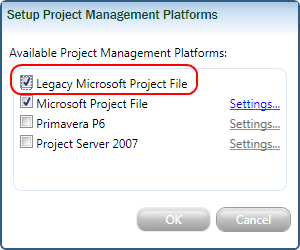
To enable this, load Steelray Project Analyzer. While holding down the left Shift key, select Configure Project Managment Platforms from the Tools menu. You should see the screen below:
Place a check mark next to the Legacy Microsoft Project File item as shown. This will allow you to select this item instead addition to the Microsoft Project File option. Use the legacy option whenever you encounter an incompatibility.
By default, all new items are created using the newer, faster method of reading Microsoft Project files. If you have encountered a problem using this method, you may elect to have a file or files read using our older method. While this method is slower, it may allow you to work through a version incompatibility.
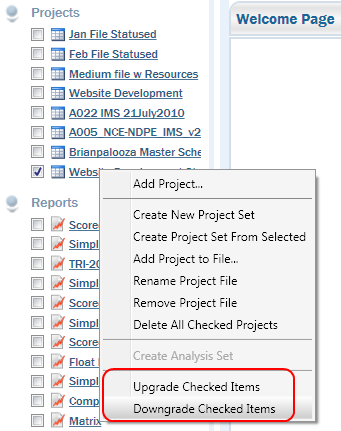
To downgrade place a checkmark next to the files you wish to downgrade. Next right click on the project and select Downgrade Checked Items as shown below.
We have a massive library of Project files collected over the years. We attempt to run our new technology against the library to weed out potential compatibility problems, but we cannot find them all. If you're having a file compatibility with the latest version of Steelray Project Analyzer, please consider sending us a copy of this file in a way that does not violate any confidentiality agreements you have in place. Usually blanking out the task names is sufficient to scrub this file of confidential information. Please check with your management team to make sure the file is allowed to be submitted to us.
Once you are able, please attach it to an email and send it to support@steelray.com.